
What are exchange rates
Exchange rates in Tide are used to convert purchase prices in a foreign currency into sales prices in the desired selling currency. These conversions are key to determining accurate pricing, especially when working with international suppliers or multi-currency catalogs.
Key concepts
This article will help you:
-
Understand what exchange rates and exchange rate groups are
- Set up exchange rates and exchange rate groups in Administration
Basic exchange rate concepts
Exchange Rate Group
An Exchange Rate Group is a collection of individual exchange rates that can be applied to specific brands, sales channels, or catalogs. These allow for tailored pricing strategies across different business structures.
-
Small organisations typically need just one default group.
-
Larger organisations often create separate groups per brand or catalog to support differentiated pricing models.
When are exchange rates utilized?
Tide applies exchange rates in these scenarios:
-
Sales price calculation when booking a product
-
Real-time conversion when no fixed sales price is pre-defined
-
Pre-calculation during product contract setup
Currency Standards
Tide supports ISO 4217 codes for all currencies (e.g., USD, EUR, GBP). This ensures compatibility across integrations and external systems.
Basic introduction
Set up an exchange rate group
Set up exchange rates
Set up an exchange rate group
To establish a new exchange rate group, please follow these steps:
- Navigate to Administration in Tide.
- Select Exchange Rates

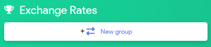
- In the left upper corner, chose New group
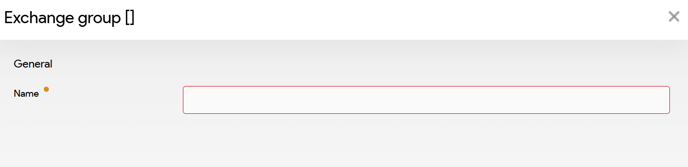
- In the exchange group panel, you can define a name for this group.
Set up exchange rates
New you can begin to setup your exchange rates:
- In the right bottom corner click on the button New exchange
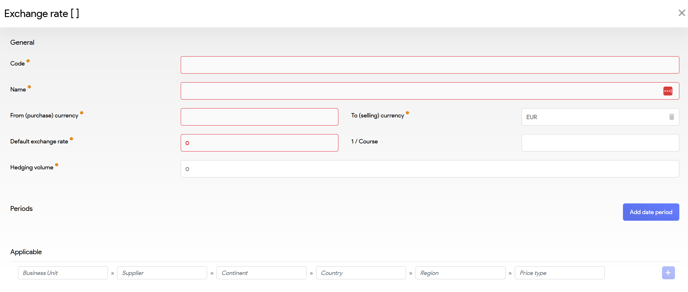
- If you want to configure a specific period, click the Add date period button.
Fields: General
| Field | Description |
| Code | Informative identifier (e.g. USD-EUR General) |
| Name | Display name, often same as code |
| Start Date / End Date | Validity window for bookings |
| Departure Date From / To | Validity window for travel/stay dates |
| From Currency | Purchase currency (autocomplete from ISO 4217) |
| To Currency | Selling currency (autocomplete from ISO 4217) |
| Currency | Exchange rate (e.g. 0.9) |
| 1/Currency | Inverse rate (e.g. 1.1) |
| Hedging Volume (optional) | Volume of foreign currency locked in at this rate |
Fields: Applicable (scope)
You can target exchange rates to specific contexts:
-
Business Unit: Brand or operational unit
-
Supplier: Specific vendor (must exist in CRM)
-
Continent / Country / Region: Geographic targeting
-
Price Type: Specific financial product type
Validation Rules
Tide checks for overlapping entries to ensure clarity and correctness:
-
Overlapping Scope: Only one rate per scope at a time
-
Booking Dates: No overlaps in booking windows
-
Stay Dates: No overlaps in stay windows
Example: You can define an USD > EUR rate for
- Hotels in the US and
- a different one for Excursions in the US over the same dates
Tide will apply the most specific match.
Best practice
- Always define a fallback exchange rate per currency pair with no scope selected.
- Set a distant end date for your exchange rates to prevent the scenario where no exchange rate is available. If no rate is found, the system defaults to a 1:1 conversion, resulting in no calculation.
- To update your exchange rate, set an end date for the current rate, for example, 1st of March. Then, input the new exchange rate starting from 2nd of March and specify an end date for this new rate.