
What is Margin?
Margins in Tide define the markup percentage added to purchase prices to calculate sales prices.
Key concepts
This article will help you:
-
Understand what the basic margin concepts are
- Configure margin groups and margin records
- Help you grasp margin logic (from basic to complex)
Basic margin concepts
Margin
Margins in Tide define the markup percentage added to purchase prices to calculate sales prices. They can be configured as flat percentages or fixed amounts, and applied globally or to specific destinations, business units, product types, suppliers,...
By default, Tide is provided with a fallback margin of 10%. It is important to change this to a correct value before letting Tide calculate selling prices.
To group multiple margin rules under a single strategy, Tide uses margin groups.
Margin Group
A margin group is a container for multiple margin rules. You assign a margin group to a calculation flow, allowing you to tailor pricing strategies across:
-
Business units (offices)
-
Sales channels
-
Catalogs or brands
When to Use Multiple Margin Groups
| Organization Size | Setup Strategy |
|---|---|
| Small organization | Use 1 default margin group |
| Large organization | Create multiple groups to handle regional/brand-specific sales strategies while keeping a centralized purchasing model |
Creating a Margin Group
- Navigate to Administration and select Margins

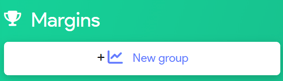
- In the left top corner click + New Group
- Enter a new margin group Name and click Save
Create a margin record
Select the desired Margin Group and click the New button in the right bottom corner.
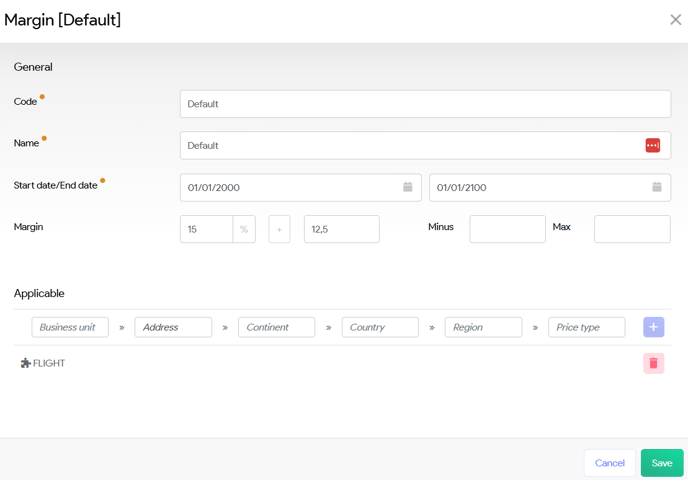
General Fields
| Field | Description |
|---|---|
| Code | Internal identifier (e.g. Default Margin, Margin hotels EU, Airport Tax) |
| Name | Display name (can match code) |
| Start Date / End Date | Booking period the margin group is active |
| Percentage | Markup % added to purchase prices |
| Amount | Fixed surcharge (can be used with or without percentage) |
Applicable Fields
| Field | Use |
|---|---|
| Office | Target a specific business unit |
| Supplier (Address) | Limit to a specific supplier (created in the CRM) |
| Continent / Country / Region | Geographical targeting |
| Price Type | Apply to product categories (e.g. Hotels, Excursions) |
Validation Rules
To prevent conflicts, Tide enforces validation:
-
No overlapping date ranges within the same scope
-
No overlapping booking periods (departure/return dates) within same scope
-
Scope uniqueness is defined by combination of filters (e.g. Price Type + Country)
Example: You can define two margins for the US—one for Hotels and one for Excursions even if the date ranges are identical.
Example
Default margin as above 10% (default set by the system) on all services except for Price type Hotel, for destinations within Spain, I want 15% Margin.
- Create a new margin record e.g. Mark up Spain for a given period.
- Set the Margin % to 15%
- In the applicable fields
- start typing Europe in Continent and select Europe
- start type Spain in Country and select Spain
- start typing Hotel in Price type and select Hotel
-

Click the plus icon to add the configuration - Click Save to save your configuration.
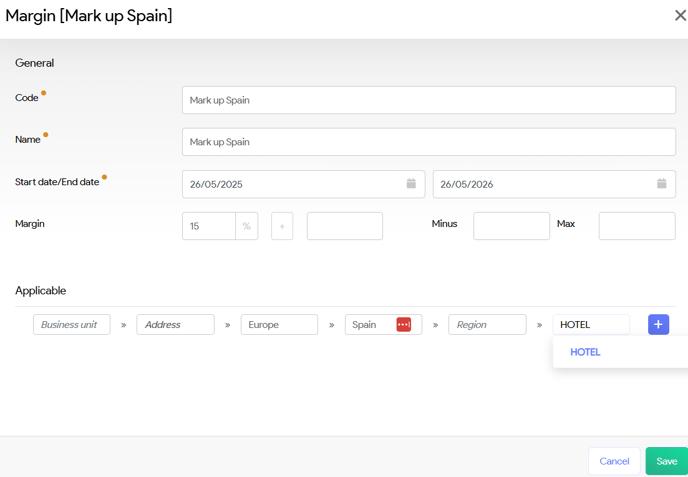
In this example, the system will apply a 10% markup to all service lines, while for Hotel products destined for Spain, a 15% markup will be calculated instead.