
What are payment terms?
Payment terms in Tide define how and when payments must be made or received for each party involved in a travel booking. They help standardize financial agreements, automate payment timelines, and support cash flow forecasting.
Key concepts
This article will help you:
-
Understand what payment terms are
- 3 types of payment terms
- Set up payment terms in Administration
Basic payment terms
There are three main categories of payment terms in Tide:
- Customer payment terms which can be subdivided into
1.a. Customer payment terms
1.b. Agency payment terms - Supplier payment terms
Customer Payment Terms
These define when customers must pay for their bookings, typically split into:
-
Advance Payment (e.g., 30% immediately after booking)
-
Balance Payment (e.g., 70% 30 days before departure)
Tide calculates these amounts based on:
-
The price types in each service line (e.g., hotel base price, taxes)
-
Whether the booking is last-minute (e.g., full payment required if booked close to departure)
You can configure customer payment terms at multiple levels:
-
Globally (Account level) – Default for all customers
-
Per Business Unit – For specific brands or regions
Payment Terms Customer settings affect:
-
Order forms
-
Travel confirmations
-
Invoices
They depend on price types linked to each price line in the file.
Agent Payment Terms
When working with travel agents, you can define separate payment terms that reflect how agents manage payment collections:
-
Agents can receive commission-based pricing, which affects how advance and balance amounts are calculated.
-
Terms can be inherited from a travel agency chain's head office, or customized per individual agency.
Tide allows you to:
-
Set different schedules for agent types (e.g., upfront vs. deferred payments)
-
Manage agent-specific rules for collecting balances from travelers
3. Supplier Payment Terms
These terms determine when you need to pay your suppliers, such as hotels, transfer companies, or local agents. These are often defined in contract negotiations and used for internal cash flow planning.
Each supplier can have one or more payment rules based on:
-
Trigger moments (e.g., after booking, before departure, after return)
-
Timeframes (e.g., 30 days before departure)
-
End-of-month logic (e.g., EOM + 14 days)
You can assign supplier terms:
-
Per supplier address in the CRM
-
Per product type (e.g., different terms for hotel vs flight services)
In the near future, Tide will allow contract-level overrides for even more detailed supplier management.
Basic introduction
Example: Setup B2C payment terms
Example: Setup B2B payment terms
Setup customer payment terms
- Navigate to Administration and click on Payment Terms

- On the Customer Payment Conditions tab, in the right bottom corner, click the New customer payment term button.
- In the Payment terms panel, you will see that you can
- set default payment terms applicable on all file types
- set default payment terms and exceptions for certain file types.
- set payment terms individually for each file type

- In this tutorial, we will focus on the Default tab; however, please note that the configurations are consistent across all tabs.
-
Field Description Name Internal label (e.g. Default B2C Terms, Default B2B Terms) Deposit - Days after creation of Booking When the advance is due. Where 0 means same day as invoice creation. Balance - Days before departure How long before departure the balance must be paid Last minute from Bookings made within this many days before departure are treated as last-minute Deposit includes commission Should commission be included in the advance invoice? (Y/N)
With a fixed deposit rate of 30% applied across all price types, there are two potential outcomes depending on whether the Deposit includes commission option is selected:
Deposit includes commission Total amount Commission
(10%)Deposit base amount Deposit
amountN 2000 200 1800 540 Y 2000 200 2000 600 - You can specify varying percentages for different price types; for instance, you might set a 30% advance for most services while requiring a full 100% for insurance. The system will automatically calculate 100% for the insurance and apply the 30% rate to all other applicable amounts.
Field Description Price Type The price type e.g., HOTEL, TAX, INSURANCE, ... After Booking (%) % of this price to include in advance invoice Last Minute (%) % to include for last-minute bookings (usually 100%) Extra Value Fixed amount to be added Type Whether the extra is applied per: booking, unit or participant
Example: setup B2C payment terms
Considering the following scenario:
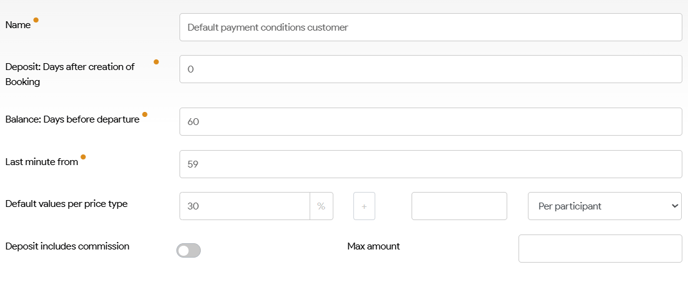
For B2C customers, we require a 30% deposit per participant to be paid at the time of booking. The remaining balance must be settled 60 days prior to departure. In cases where the booking is made less than 60 days before departure, the customer is expected to pay the full amount immediately.
This is how we would go about setting it up as a single payment term:
Example: Setup B2B payment terms
Considering the following scenario:
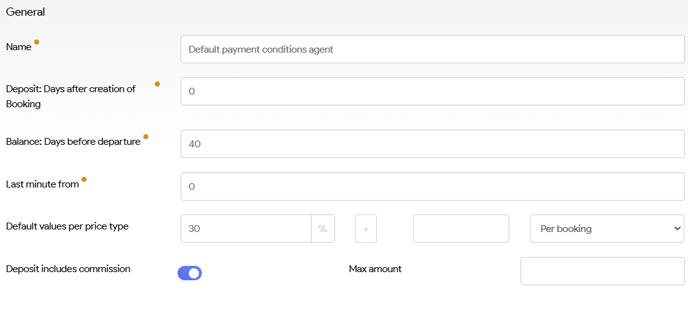
For B2B booking, we require a 30% deposit per booking to be paid at the time of booking.The deposit should include commission. The remaining balance must be settled 40 days prior to departure. In cases where the booking is made less than 60 days before departure, the customer is expected to pay the full amount immediately.
This is how we would go about setting it up as a single payment term:
Setup supplier payment terms
- Navigate to Administration and click on Payment Terms
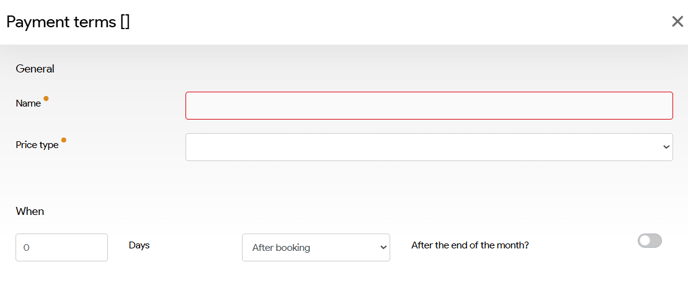
- On the Supplier Payment Conditions tab, in the right bottom corner, click the New supplier payment term button.

| Field | Description |
|---|---|
| Name | Internal label (e.g. insurance, hotels Greece) |
| Price type | Select the applicable price type |
| When - Days | Specify the relevant number of days that apply to this payment term. |
| When - Moment |
|
| When - After the end of the month? |
When this field is ticked, then the number of days will only be counted from the end of the applicable month. |
-
Use 100% for all price types in last-minute scenarios if you want a single total payment.
-
Define standard values that apply when no price-type-specific rule is given.
-
Use per-unit or per-participant extras sparingly for clarity in customer communication.
| Use Case | Recommended Setup |
|---|---|
| Small organisation | One payment terms config linked to your Account |
| Large organisation | Separate payment terms per Business Unit |
| Travel Agents with unique terms |
One config per agent or chain. These payment terms can be linked via CRM |