
Guide to the search files panel
This panel enables you to locate files quickly and efficiently.
Basic usage

Open Search panel
To open the panel, on the File management, select Files
In the Files interface, click on the green Search file button, which is located on the right bottom corner.
Search file (apply filters)
Set the filters you want to apply to your search and click Search.
Clear filters
To clear your selected filters, on the Files interface, click on the white Clear filters button, which is located on the right bottom corner.
Note that this button will only be visible when filters have been applied.
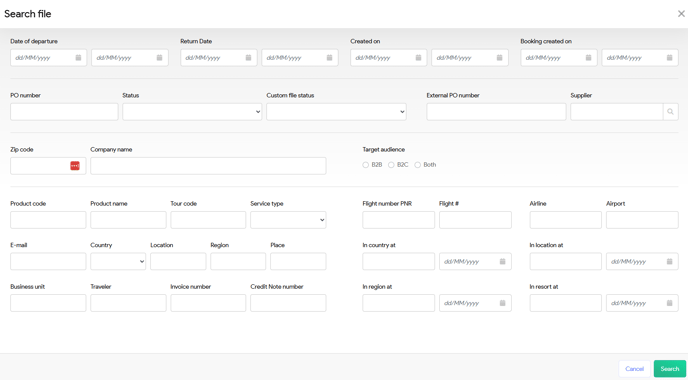
Filters fields
Date and creation filters
| Field | Description |
| Date of departure | Choose the starting date for your travel period selection. |
| Return Date | Choose the end date for your travel period selection. |
| Created on | The date the file was created in the system. The file type can be option, offer or booking. |
| Booking created on | The date the file was created as booking in the system. When a file is created as a booking, the booking date will match the creation date. However, if the file was initially created as an offer and later converted to a booking two days afterward, the booking date will differ from the original creation date. |
Booking and status filters
| Field | Description |
| PO number | Purchase Order reference used for internal tracking. |
| Status | Current state of the booking (e.g. new, option, offer, booking canceled by you and canceled by client). |
| Custom file status | Custom status defined by the user for enhanced tracking. |
| External PO number | External booking reference (e.g. when using bedbanks) |
| Supplier | Filter files where the serviceline is linked to the selected supplier address |
Date and creation fields
| Field | Description |
| Zip code | Customer's postal code. |
| Company name | The name of selected travel agent |
| Target audience | Indicate the audience type for the booking: B2B, B2C or both. |
Additional filter options
| Field | Description |
| Product code | Code of the booked product or travel service. |
| Product name | Name of the booked product or travel service. |
| Tour code | Specific tour code for predefined holiday packages. |
| Service type | Type of travel service (e.g., Hotel, Flight, Transfer). |
| Search by main booker's email address. | |
| Country | Specify the destination country assigned to the service line. |
| Location | Specific area or city within the country. |
| Region | Specify the destination region assigned to the service line. |
| Place | Specify the local place or resort name assigned to the service line. |
| Business unit | Filter bookings based on the business unit. |
| Traveler | Name of the traveler who participates in the booking |
| Invoice number | Search by invoice reference tied to the booking. |
| Credit Note number | Reference for any issued credit note related to the booking. |
| Flight number PNR | Passenger Name Record for a flight service to filter on. |
| Flight # | Specific flight number (e.g., KL123). |
| Airline | Airline name or IATA code. |
| Airport | Departure or arrival airport. |
| In country at | Date the travelers enters the destination country. |
| In location at | Date the travelers arrives at the specific location. |
| In region at | Date of entry into the specified region. |
| In resort at | Arrival date at the specific resort or hotel. |