
How do setup VAT in Tide?
Key concepts
This article will help you:
-
Understand what the basic VAT concepts
- Configure sales tax in Tide
If you are not yet acquainted with the concept of price types in Tide, we recommend that you read the article titled Setting Up Price Types" before proceeding further.
In this article, we will discuss the basic VAT concepts to be able to setup the VAT in Tide. We won't delve deeper into the all concepts of VAT, as discussing them in detail would take us too far off topic here. You may find answers to any questions you might have about VAT in the dedicated section provided: VAT.
Basic VAT concepts
VAT on Margin
The VAT in Tide is the VAT calculated on the Margin. This VAT rate will be determined by:
- The type of package tour e.g. hotel only, package, cruise,...
- The role of the buyer: own organisation, resale
- The destination (Within EEC / on-EEC)
- Belgian customer (travel agency) or not
The type of package
There are 4 types of package holidays:
- A normal 'package' (transport + stay + ...)
- Transport only
- Hotel only
- Cruise
Each of these types of package holidays has its own 'Fictive Margin' applied by the tax authorities.
The role of the buyer
- Own organisation
- Resale
- Professionals offering a linked travel package
The final seller, known as the 'organizing entity', is responsible for issuing an invoice that includes VAT to the end customer, utilizing their identification code and other relevant details. For customers who possess a VAT number, such as travel agencies or companies, the VAT calculation is provided in greater detail.
Destination
VAT will only be charged if the destination is within the EEC. There are regions located within the EU, but where European VAT is not valid. These EU VAT or EU non VAT settings can be configured on country/region level.
To learn how to configure these settings, please refer to this section.Time of booking
The new circular is only valid if the booking (i.e. not quotation) was created after 01/01/2022.
Files booked before that and with changes still happening are not covered by the new circular.
VAT and VAT on margin (Belgium)
In Tide, you create different 'business units' for different brands/branches of the company. If the address of a business unit is located in Belgium, then the typical Belgian 'VAT on notional margin' is used. If a business unit is located within the EU, the percentages on sales amounts are used.
For Belgium, we therefore use the notional margins. The type of package trip determines this notional margin. Examples:
Package
- Notional margin = 18% of selling price so VAT on Margin
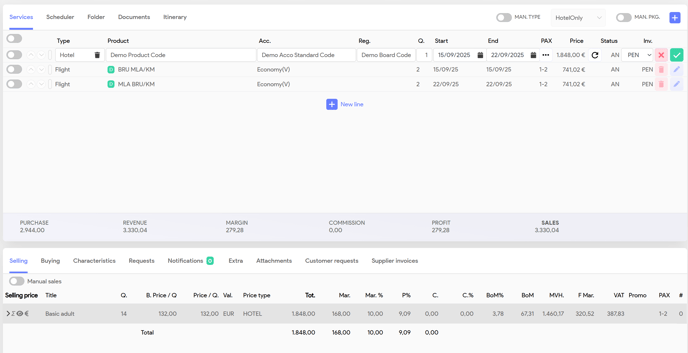
- 21% (Belgian VAT rate) × 0.18 (notional margin) = 3.78%
Cruise
-
Notional margin = 13% of selling price so VAT on Margin
21% (Belgian VAT rate) × 0.13 (notional margin) = 2.73%
Hotel Only
-
Notional margin = 8% of selling price so VAT on Margin
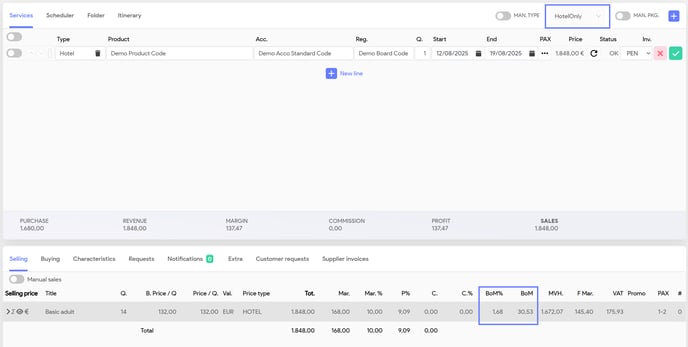
21% (Belgian VAT rate) × 0.08 (notional margin)e = 1.68%
VAT (Netherlands)
If a business unit is based in the Netherlands, the VAT configuration is significantly simpler. You can establish a single 21% VAT rate that applies to most price types. For any specific exceptions, you can easily create additional records with different percentages and associate them with the appropriate price types.
Basic introduction
Define VAT percentages
You can manage the VAT percentages (sales tax percentages) in Tide by setting them up in Administration.
- Navigate to Administration and select Sales Taxes
- Click + New to add a new sales tax.
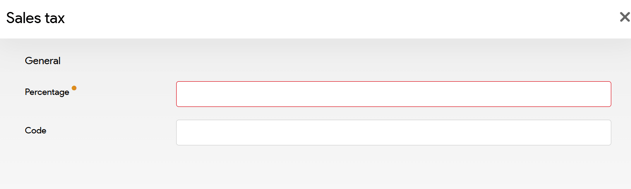
| Field | Description |
| Percentage | Here you can define the 'VAT on margin' percentage e.g. 1,68 |
| Code | The code that will work as identifier |
VAT on margin and notional margin
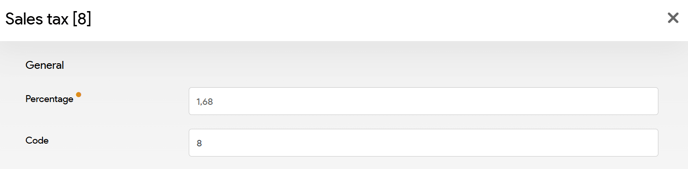
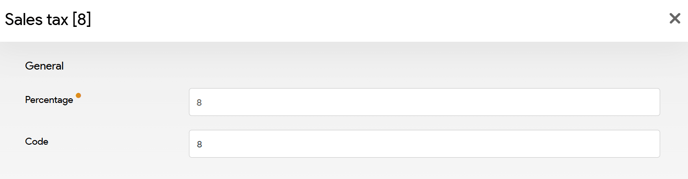
Depending on your accountancy architecture, it's advised to setup up both the VAT on margin percentage and the notional margin percentage as separate records linked the notional margin percentage code.
E.g. Hotel only VAT configuration
We'll have to records that are assigned to the 8% notional margin for hotel only. We'll set it a code for 8 with the 1,68%, that will be used to correctly calculate the VAT on Margin. The second record with 8% will be used to pass along the correct notional margin percentage to the accountancy system.
Setting up VAT on Margin
Once you have defined the Sales tax you can begin by configuring them in the system.
In Tide the price type will define the additional calculate properties of the price line. So the VAT percentage is also configured on price type.
- Go to Administration and select Price types
- Select the Price Type for which you want to set up a specific VAT %
- Navigate to the Sales Tax tab
Here you can set up the different sales tax percentages you want the system to calculate, based on the following criteria:
- Sale type
- File type
- Recipient type
These concepts are detailed in the preceding section Basic VAT concepts.
Let's set up a concrete example. We'll set up 2 sales tax configurations for the price type HOTEL.
- 18 % for package bookings
- 8 % for hotel only bookings.
 |
Click the plus sign to create and add new configurations for sales tax. |
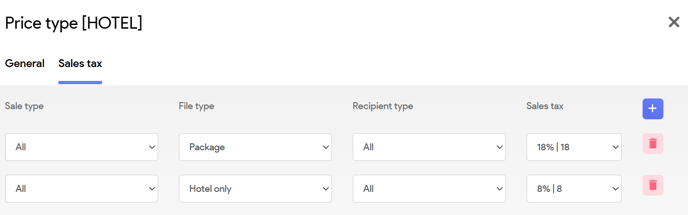
You will see in the booking on each service line, how much VAT on margin (BoM) has been calculated. Please note that indicated in the image below the file type is automatically set to Hotel Only, thus we expect a 8% notional margin, which results in a 1,68% VAT on Margin.
| Field | Description |
| BoM% | Will display the VAT on Margin % that has been applied. |
| BoM | The actual VAT on Margin amount that has been calculated. |
After adding flight lines (see image below) the file type is automatically set to Package, thus we expect a 18% notional margin, which results in a 3,78 % VAT on Margin.
Setting up EU VAT exception
For example, destinations within mainland Spain, VAT on Margin must be applied. However, for the Canary Islands (e.g. Tenerife), which are part of Spain, VAT on Margin is not applicable.
- Navigate to Administration and select Locations
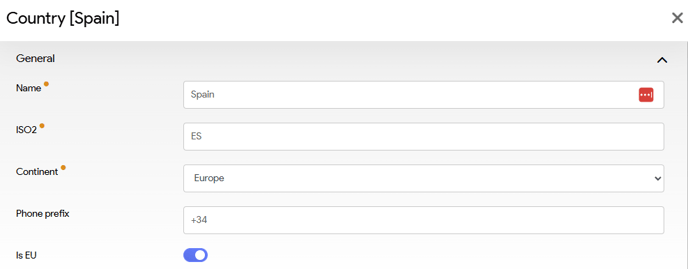
- Under Locations, go to the Countries tab and select Spain.
- Under Spain you enable Is EU and click Save
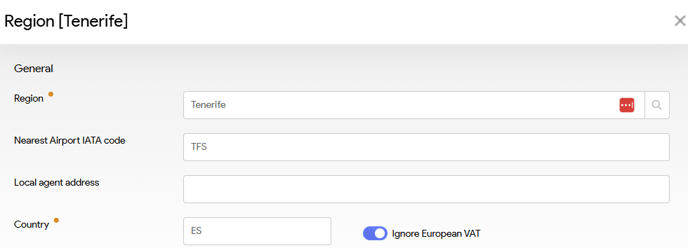
- Go to the Regions tab en select Tenerife
- Tick the Ignore European VAT and click Save
- You can now do this for other regions in the Canary Islands (Tenerife, Fuerteventura, Gran Canaria, Lanzarote,...).