
What Are Price Types?
In Tide, a price type defines the financial characteristics and display behavior of a price line within a product.
Key concepts
This article will help you:
-
Understand price types and related concepts
- Set up price types configurations
- Understand the essential financial and display behavior of price types.
Basic price type concepts
Price type
Every service (e.g., flight, hotel, transfer) includes one or more price lines, each tagged with a price type. This price type will defines the financial attributes and display behavior of a price line within a product. Each price type:
-
Drives sales price calculations
-
Controls how the price appears in documents, quotations and booking dialogs
-
Governs VAT behavior based on sales roles and file types
Financial attributes
- Commission terms
- VAT (Sales Tax)
- Margins
- Cancellation policies
- Payment terms
Display attributes
-
Whether it is included in the overall package price
-
Whether it’s shown separately (e.g., taxes or discounts)
-
Whether it shows a price or just a label
Pre-configured Setup
Tide comes equipped with a foundational set of frequently utilized price types, such as tax, ticket, hotel, transfer,... ready for immediate use. You have the flexibility to customize and expand this selection to align with your specific sales strategies and display requirements.
Start simple. Use 1-2 price types per service type. Over time, you can grow into a more granular setup.
Basis introduction
Manage price types
- Navigate to Administration
- Click on the Price types button

- In the Price type screen, you will get the list of price types.
Here you can manage the price types.
 |
In the right bottom corner, click the + New button to add a price type. |
 |
To edit a price type, click on the blue pencil icon. |
 |
To delete a price type, click on the trash bin icon. |
Configuration Fields: General
General
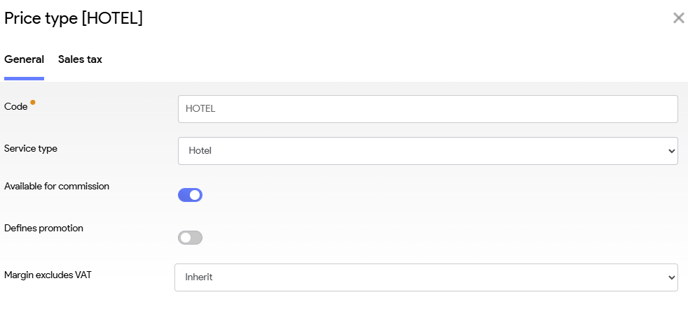
| Field | Description |
|---|---|
| Code |
An identifier only for internal use. |
| Service type | Chose a corresponding service type. (WIP service types article) |
| Available for Commission | Should price type be eligible for commission? (default: yes) |
| Defines Promotion | Enables website logic for promotional display. |
| Margin excludes VAT | Indicates whether the margin is calculated excluding VAT.. I You can chose to inherit from your business unit (default), alternatively set it to yes or no. |
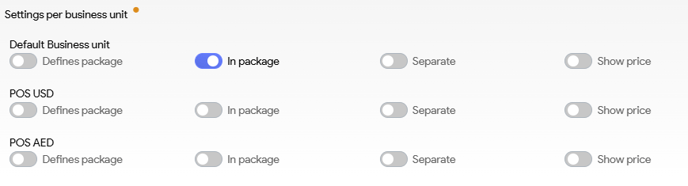
| Field | Description |
| Defines package | Coming soon. At the moment this functionality is not yet in use. |
| In Package |
Should the price be included in the total package price |
| Separate | Should the price-line be shown separately (interfaces, documents,...) |
| Show Price | Should the price be displayed or not. Works only when the Separate setting has been set to yes. |
Translations
Here you can setup the multilingual configuration that will be displayed in lists. These field won't be used on interfaces and documents.
Configuration Fields: Sales tax

You can add a Sales tax definition that applies to this price-type. You can set up multiple criteria.
-
Sales Type: Own Organisation vs. Resale
-
File Type: Package, Hotel-only, Cruise, Transport-only
-
Customer Type: B2C, B2B (domestic or foreign)
We'll explore this further in this article.
✈️ Example 1: Flight
| Component | Price Type | Amount | Display | Financial Logic * |
|---|---|---|---|---|
| Ticket | TICKET | € 100 |
|
|
| Tax | TAX | € 25 |
|
|
🏨 Example 2: Hotel
| Component | Price Type | Amount | Display | Financial Logic |
|---|---|---|---|---|
| Room | HOTEL | € 200 |
|
|
| Promo | PROMOTION | € -50 |
|
Same financial rules as room price |
Promotions can be highlighted on the website with strike-through visuals using the Defines Promotion flag.
Best Practices
-
Use price types to align pricing logic with financial reporting
-
Clearly separate core services (ticket, hotel) from optional extras (insurance, promo)
-
Keep naming conventions consistent for faster team onboarding