A step-by-step guide to searching and booking package products via the Tide platform or your own integration.
What Is It?
The package search flow enables users to go from browsing available travel products to booking them. It is structured into three sequential steps:
-
Search – Locate products based on various parameters
-
Details – Retrieve a full, bookable package of a selected product
-
Book – Finalize the booking
This article explains the full flow from search to booking, along with request examples and endpoint references.
Search Logic and Components
Search Parameters and Flow
The search begins with input parameters that define which products should be returned. These parameters include:
-
Product identifiers
-
Location data
-
Price range (minimum and maximum)
-
Inclusion of flights
-
Allotment filters
You must also specify a SearchType, which affects how date filters are interpreted:
-
Default (0):
FromDateandToDaterepresent the desired availability window for packages. -
Allotment (1): Finds allotments that start between
FromDateandToDate. -
FixedDuration (2): Uses
FromDateas a fixed start date for products with fixed duration. -
Flight (3): Only applies during the Details step (see Streamed Flights).
Caching and Real-Time Fallback
-
If matching results are available in the cache, they will be returned and the search will be stopped regardless of how many results there are.
-
If no cached results are found or caching is disabled, the system will fall back to a real-time search.
-
Real-time fallback can be disabled by setting a flag in the request parameters.
The response includes a list of booking package items, with key data required to display results (e.g., cheapest option per product).
Optional: ElasticSearch Integration
Elasticsearch can be used to run more advanced searches on cached products. This is optional and offers improved flexibility for search interfaces.
More details are available upon request.
Details Logic and Package Composition
Once a product has been selected from the search results, the Details step retrieves a full package needed for booking. This includes:
-
Leading Product: The main item the package is based on.
-
FlightPool: Available flights, unless the leading product is of type "Transport".
- HotelPool: Available hotels, unless the leading product is of type "Accommodation".
-
Default Products: A composite of required and optional products, such as:
-
Subproducts (contained within the leading product)
-
Location- or type-based defaults
-
Airline- and airport-specific defaults (based on the available flights)
-
This response is designed to support the remainder of the booking flow.
Booking flow
The Details response allows the booking flow to be started. Each selectable item includes an IsSelected flag—setting this ensures it is included in the final booking (File).
Booking Action
The Book step finalizes the package into a File—a confirmed booking record.
-
This step consumes all data returned by the Details step.
-
Upon successful creation, the file status is set to the status given in the request.
-
From here, it can be transitioned to another status if required (e.g. when payment is received).
Implementation Options
You can implement the booking logic in two ways:
-
Custom Integration:
Develop your own logic and user interface by calling the Tide Book API directly. This gives you full control over the booking flow and UI behavior. -
Standard Booking Components (Recommended for Fast Integration):
Use Tide’s prebuilt Standard Booking Components, which embed booking logic, UI elements, and validation into your website.
→ Read the full Standard Booking Components guide
This flexibility allows teams to choose the integration depth that fits their product timeline and UX design.
Booking Actions
-
Price Breakdown: View full price composition at booking time.
-
Voucher Validation (Optional): Apply and confirm voucher codes.
Optional Post-Booking Actions
-
Update status (for example) from Offer → Booking after payment or validation.
- Update file: Change selected options using the same package.
-
Set Custom Status: Modify or personalize status fields post-booking.
Example Requests and Responses
1. Package Search Request
This request initiates a search for available packages using parameters like destination, dates, room configuration, and flight inclusion.
2. Package Details Request
Use this request to retrieve a complete booking-ready package for a specific product.
The details response provides the full booking structure, including selected and optional flights, accommodations, excursions, and insurances.
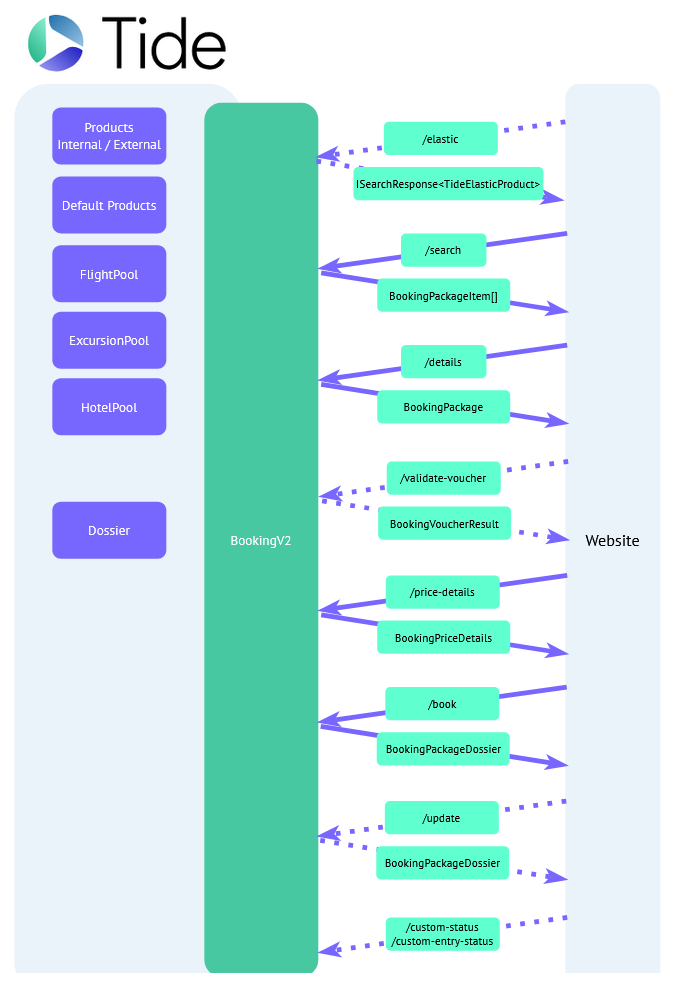
Endpoint Flow Diagram
The following diagram shows the interaction between the main API endpoints. The dotted arrows indicate it is an optional API call.
The base endpoint is {your-tide-instance}/api/web/booking/v2 .Then you can use the suffixes you see in the diagram.
If you don't yet have access, check out Accessing the Web API .