
Configure account properties
General
Address data
E-mail
Settings
Standard products
General
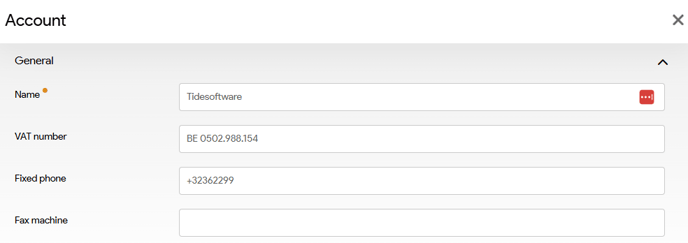
These fields will allow you to set the main company data such as Name, VAT number, Phone,...
| Field | Description | Mandatory |
| Name | The name of your company | Yes |
| VAT number | The VAT number | No |
| Fixed phone | The main phone number | No |
| Fax machine | The number of the fax machine | No |
Address data
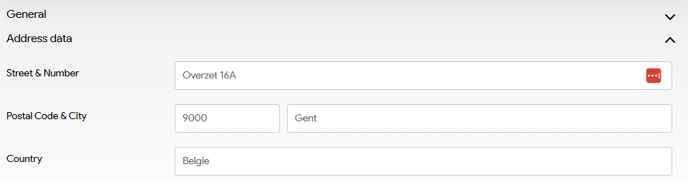
This section will enable you to configure the company's address data.
| Field | Description | Mandatory |
| Street & Number | The street and number of your company's address | No |
| Postal Code & City | The postal code & city where your company is located | No |
| Country | The country where your company is located | No |
Email
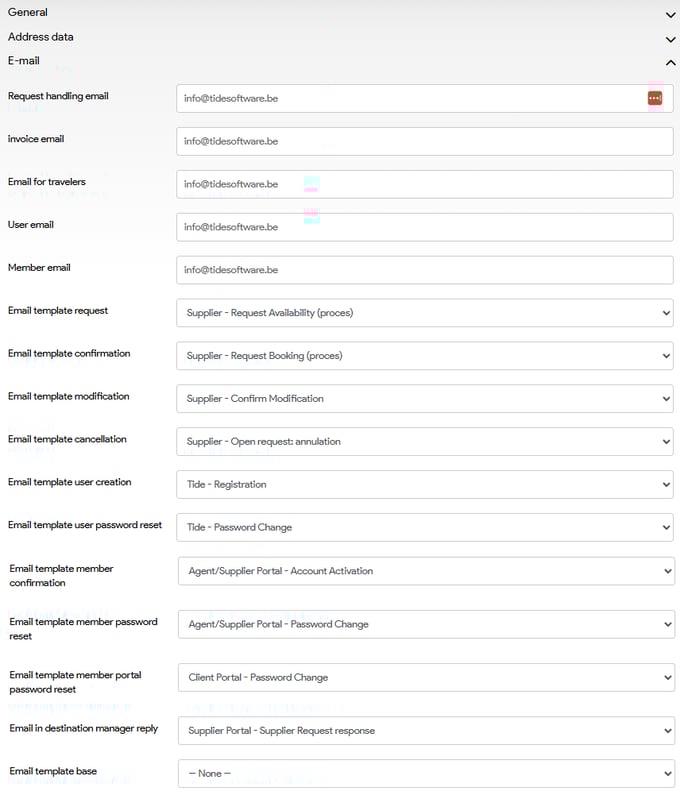
In this section, you can configure all the general Email Addresses and Templates that will be utilized in their specific processes. Please note that the templates must be created prior to configuration.
For guidance on creating email templates, refer to the article titled "Create Email Templates." If you require further assistance, feel free to reach out to our support team.
| Field | Description | Mandatory |
| Request handling email * | Email address from which availability request will be sent | No |
| Invoice email * | Email address from which invoices will be sent | No |
| Email for travelers * | Email address from which clients will be contacted. | No |
| User email | Email address from which tide users will be sent | No |
| Member email | Email address from which communication to members will be sent | No |
| Email template request * | Template that will be used to request availability with the supplier for products that are on request. | No |
| Email template confirmation * | Template that will be used to confirm to booking with the supplier (IDM process). | No |
| Email template modification * | Template that will be used to inform the supplier that the booking has been changed. | No |
| Email template cancellation * | Template that will be used to inform the supplier that the booking has been cancelled. | No |
| Email template user creation | Email template that will be used to when creating a new Tide user | No |
| Email template user password reset | Email template that will be used to reset the password of a Tide user | No |
| Email template member confirmation | Email template that will be used for the IDM/B2B account activation mail that will be send to the supplier. | No |
| Email template member password reset | Email template that will be used for the IDM/B2B account password reset mail that will be send to the supplier. | No |
| Email template member portal password reset | Email template that will be used for the client portal account password reset mail. | No |
| Email in destination manager reply | Email template that will be used to handle the response of the Supplier | No |
| Email template base * | No |
Fields with an asterisk (*) can also be customized within each business unit.
Fields without an asterisk are restricted to configuration at the Account level only.
Settings
In this section, we will configure essential financial and administrative settings.
Below the table, we provide detailed explanations for some of the more complex fields.
| Field | Description | Mandatory |
|
Authorization reports |
This will managed a system engineer |
No |
| IBAN | International Bank Account Number used to receive payments. | No |
| SWIFT | Bank Identifier Code (BIC) used for international wire transfers. | No |
| License | No | |
|
Standard sales currency
|
Default currency used for issuing invoices and processing sales. | No |
| Payment terms |
Default agreed-upon conditions outlining when and how payment should be made. For more information see Set up Payment Terms |
No |
| Cancellation Policy | Default rules and fees that apply when a booking or service is canceled. | No |
|
Commission excludes VAT
|
Indicates whether the commission base amount should be with included or excluded VAT | No |
|
Margin excludes VAT
|
Indicates whether the margin is calculated excluding VAT | No |
|
Pax order price calculation
|
The order of the passengers that should be used when calculating the price | No |
|
File status when hotel on request.
|
The status the file should get when a hotel product is on request. | No |
|
Locale language
|
The regional setting | No |
|
Invoice payment reference
|
The payment reference format you would like to use on the corresponding documents | No |
|
File numbering
|
Configure the format of the file numbering | Yes |
|
Invoice numbering
|
Yes | |
|
Credit Note numbering
|
Yes | |
| Supplier payment numbering | Yes | |
| Self billing numbering | No |
Pax order price calculation
The order of the passengers that should be used when calculating the price,
possible values:
- Adults, then children as input
- Adults, then children from old to young
- Adults, then children from young to old
File status when hotel on request.
The status the file should get when a hotel product in the file, is on request. If the "Standard" option is chosen, the file status will not be altered and will stay as is.
Possible values to chose from.
- -- Standard --
- Booking
- Canc. by client
- Canc. by you
- New
- Option
- Quotation
Invoice payment reference
- Inherit:
- depending on the configuration inherits this setting from either Account or
parent Business Unit
- depending on the configuration inherits this setting from either Account or
- [DossierNumber]:
- the booking number will be used as payment reference
- [Invoice number][File number][First letters of main booker's last name]:
- Custom reference format
-
Structured payment reference (OGM)
The Structured Payment Reference (OGM) is a specific format used to create a standardized reference for payments associated with bookings. This reference helps in the easy identification and reconciliation of transactions, ensuring accuracy and efficiency in financial processes.
Numbering
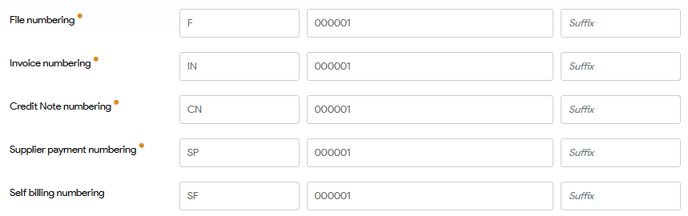
Set the format of the numbering system you would like to adopt in Tide.Applicable to all numbering format configurations in Tide such as File numbering, invoice numbering, Credit Note numbering, Supplier numbering and Self billing numbering.
The numbering format configuration consist of 3 parts viz.
- Prefix: A desired fixed prefix that can be assigned at the beginning
- Start number: The initial number at which the numbering sequence begins.
- Suffix: A desired suffix that can be assigned at the end

Standard products
Standard products are specific products that can be configured so they will always be added to each file that is created. This is the highest level where a standard product can be configured.
This section requires you to have a product, so this will be configured - when your businness benifits from it - in a later stage.
Next steps
So congratulations, you just finished setting up you account. Let's dive into the next chapter Business units