
How does the sales price calculation flow work.
In Tide, products have both purchase prices (PP) and sales prices (SP). Sales prices are typically derived from purchase prices using predefined margin and currency conversion rules. The pricing flow can be simple or complex depending on your organizational setup.
Key Concepts
-
Purchase prices (PP): Supplier-side costs, these can be in foreign currencies.
-
Sales prices (SP): Customer-side prices, typically in your local currency.
-
Calculation flows: Logic that transforms purchase prices into sales prices using exchange rates and margin rules.
-
Sales price determination: Logic that determines which sales price to use, based on business unit, sales channel, or catalog.
When are sales prices calculated?
Sales prices are calculated in different contexts within Tide:
-
Product contract setup
-
Sales prices can be pre-calculated and stored. Ideal if you need to lock or manually override sales pricing.
-
-
At time of booking (preferred)
-
If only the purchase prices are configured - and no pre-calculated sales price are generated or created, Tide calculates the sales price in real time.
-
-
Supplier API integration
-
For products booked through external APIs, purchase prices are retrieved and passed through your calculation flow in real time.
-
-
À la carte files
-
Sales prices are always calculated based on the purchase price.
-
⚠️ If you need to calculate purchase prices based on sales prices, contact Tide support to enable this reverse flow.
Simple Example - Small to Medium-Sized Organizations
A basic calculation flow:
-
PP in USD
-
Use exchange rate group: 'default'
-
Use margin group: 'default'
-
Resulting SP in EUR

Complex Example – Large Organizations
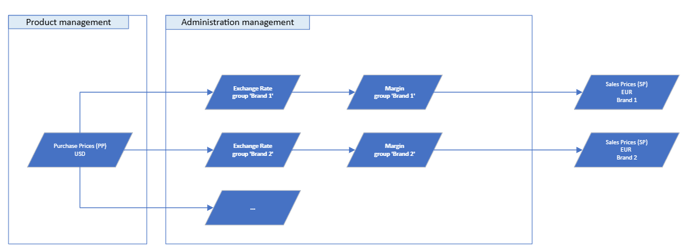
Organizations with multiple brands or units may define separate flows for each:
-
PP in USD
-
For brand 1 the price calculation flow will take the following steps:
-
Exchange rate group:
brand1is used -
Margin group:
brand1is used -
Calculate sales price: SP in EUR for brand 1.
-
-
For brand 2 the price calculation flow will take the following steps:
-
Exchange rate group:
brand2 -
Margin group:
brand2 -
Calculate sales price: SP in EUR (brand 2)
-
Each brand maintains its own strategy but shares a central purchase price.
Sales Price Selection Logic
Once multiple sales prices are calculated, Tide determines which price to use based on:
-
Business Unit
-
Sales Channel
-
Catalogue
-
Price Tag Code
This ensures the right price is used for the right context.
More information about business units, sales channels.
Configuration
Navigate to the Administration menu and scroll down to and select the Price calculation item.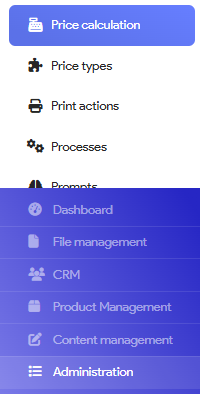
Here you will find two tabs:
- Price card codes
- Price selections
Price card
- Click on the Price card codes tab
- Click on the button "New price card code" in the bottom right corner

- The following panel will appear, where you can start setting up your price card code.
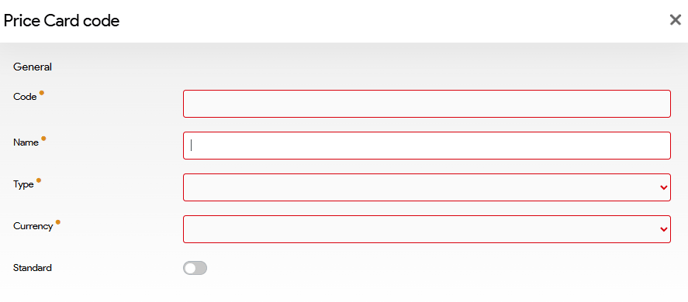
| Field | Description |
|---|---|
| Code | Identifier for the price tag (e.g., PP EUR for purchase price in EUR) |
| Name | Descriptive name of the price tag |
| Type | Either Purchase prices or Sales prices |
| Currency | Select the currency code from the list |
| Standard | Enabling this will automatically add this price tag to all new product contracts |
For sales price types, you must also define:
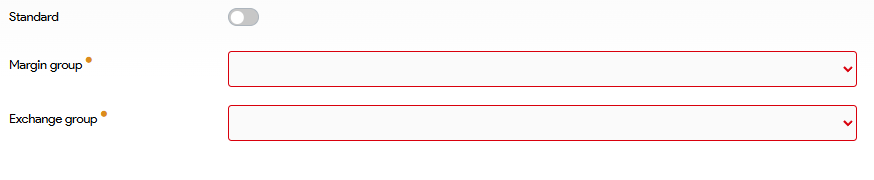
-
Margin Group: Select from configured margin structures
-
Exchange Rate Group: Define conversion logic for currency changes
The setting must have been created first. If this is not done yet, please refer to the following articles Margin and Exchange rate.
Price Selection
- Click on the Price selection tab and in the bottom right corner
- Click on the button "New price selection" in the bottom right corner
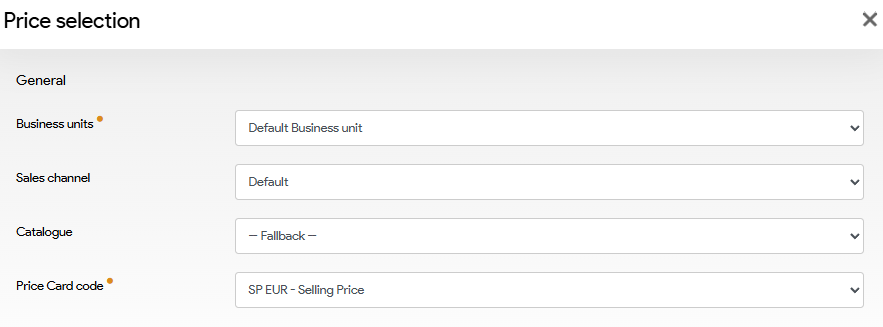
| Field | Description |
|---|---|
| Business Unit | Limits rule to a specific unit which can be selected here |
| Sales Channel | Applies only to selected channel(s) |
| Catalog | Optional catalog-specific rule |
| Price Tag Code | Links the applicable sales price tag |