
This article will provide a high level overview on how to get started with Tide.
Key Concepts
In this article, we will cover a variety of essential topics:
Basic components
We will begin by establishing the foundational components (Accounts, business units, sales channels,...) that will be backbone of your company's setup.
Once these key elements are in place, we will examine and setup the additional configurations in detail to expand them into a cohesive and fully functional.
Products
Here will guide you through the concepts of products in Tide, which will be the building blocks for your booking.
Booking
Next, we will walk you through the booking process, equipping you with the knowledge and steps necessary to successfully create your first booking.
Best Practices and Insights
In this concluding section of the tutorial, we will share valuable best practices and insights that have been accumulated over the years to enhance your experience with the Tide platform.
- Basic components
- Essential setup procedures
- Products
- Booking
- Best practices and insights
Basic components
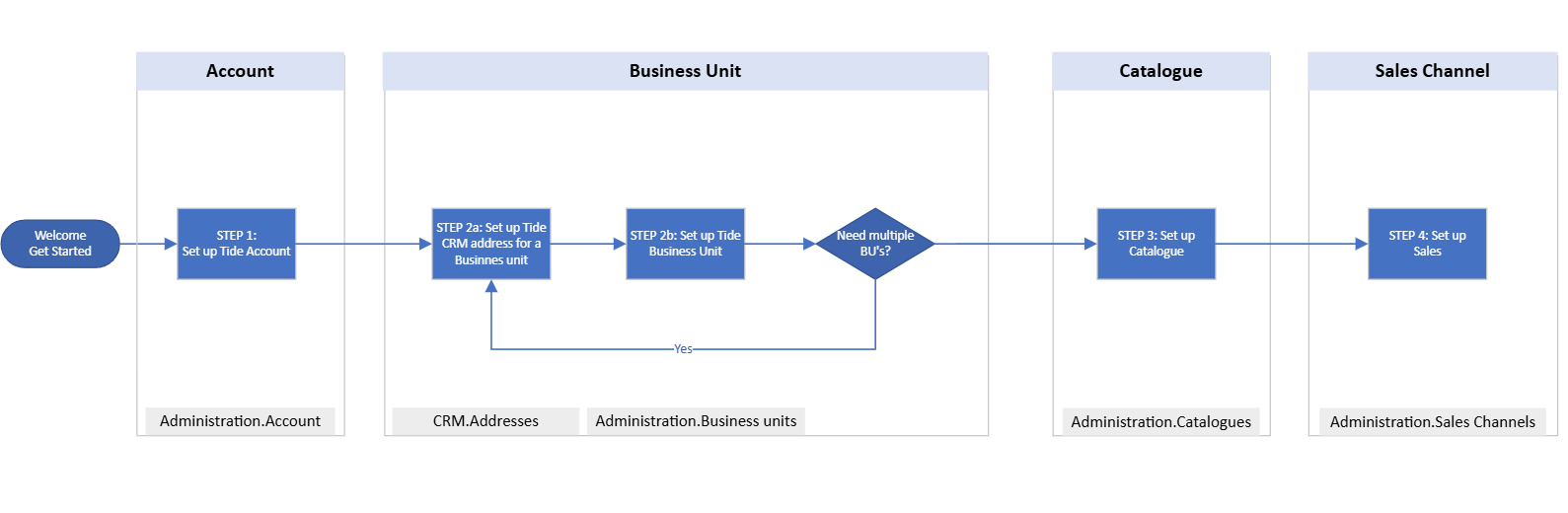
We will begin by organizing your company within the Tide platform. This process involves establishing an Account, creating a Business Unit, configuring a Sales Channel, setting up a Catalogue, and concluding with the setup of user accounts.
We will explore each of these concepts in detail, providing clear explanations for better understanding.
It is advisable to follow the sequence outlined below for optimal results.
- Create and configure a Tide Account
- Create and configure a CRM address for your Business Unit
- Create and configure a Business Unit
- Create and configure a Catalogue
- Create and configure a Sales Channel
- Link Sales Channel to BU
- Create and configure Users, roles and teams
Essential setup procedures
After configuring the core components, we can shift our focus to the finer essential configurations.
While these configurations aren't necessary mandatory for initiating bookings, they significantly improve the overall functionality, streamline the booking process and enhance the efficiency of both the system and your business. Therefore, it is highly recommended to familiarize yourself with these configurations and customize them to align with the specific requirements of your business.
- Setting up Mark up
- Setting up Financial price types
- Setting up VAT
- Setting up Agency commission
- Setting up Payment conditions
- Setting up Rate of Exchange
Product
In this section, we will explore the concept of products within the Tide platform, providing you with a comprehensive overview of their various properties and the steps necessary for their setup.
- What is a product: understanding the key concepts of a product
- Create a product: learn how to create a product
- General tab: understanding the general tab and how to set it up
- General tab - Catalogues and sales channel: understanding product catalogues and sales channels.
- General tab - Seasons: Guide to setting up seasons
- Accommodations: Learn how to manage accommodations
- Boards: Learn how to manage regimes
- Price blocks: understanding and managing prices in Tide
- Allotments: understanding allotments and how to manage them
- Notifications: understanding notifications and blocking availability
Booking
- File interface - Overview: overview of the components of the file interface
- File interface - manage booking: create, modify and cancel bookings
Booking related concepts that you might want to get familiar with:
Best practices and insights
Basic configuration settings
-
Turn off your pop up blocker.
-
Set up DNS Records
Share the email domains that will be used for sending emails with the Tide team. They will then provide you with the necessary DNS records. This step is essential for enabling Tide to send emails from your specified domain, such as @yourdomain.com. - Your company logo
- Upload your logo(s) in the CMS, media library (more information on this)
- Select your logo(s) at the admin > business units
- Configure cancellation conditions
- Next steps: Tide process
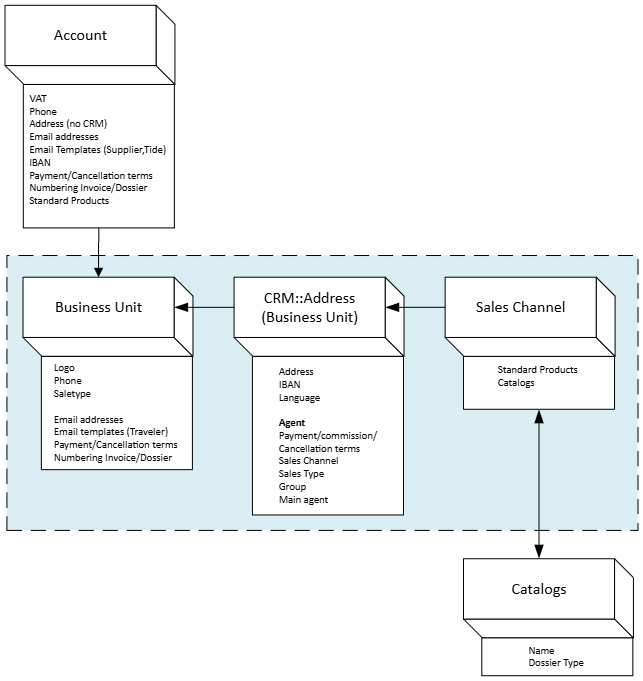
Tide Business setup: Architecture Overview
The following drawing illustrates the relationships between the Account, Business Unit, Sales Channel and Catalogue. In the upcoming chapters, we will explore these connections in greater detail and discuss important concepts such as inheritance.
Let's get started!
Let’s get started on our journey to mastering the Tide platform with What is a Tide Account